Network cards and MAC addresses (Media Access Control)
Suppose we want to send a photo from a computer to a printer. The photo is stored inside one machine, but the printer is another machine. Something must carry the data out, and something must say which interface should receive it. A network interface does the first job; a MAC address, short for Media Access Control address, helps with the local delivery. We will follow that one photo, starting with the hardware we can see.
How does a photo leave a computer?
A computer represents information using bits. A bit has two possible values, written 0 and 1. A photo needs many bits; software arranges them so that another computer can reconstruct the picture. Before thinking about addresses, we only need one point: sending a photo means transferring an organised sequence of data.
The hardware that joins a computer to a network is a network interface controller, or NIC. A removable version is often called a network card. Wired Ethernet uses a cable; a Wi-Fi interface uses radio signals. This lesson opens a wired Ethernet card so we can trace a visible route from the computer connection to the cable socket. The broader idea of a network interface also applies to Wi-Fi, although its radio hardware and frame details differ.
Follow the parts of a network card
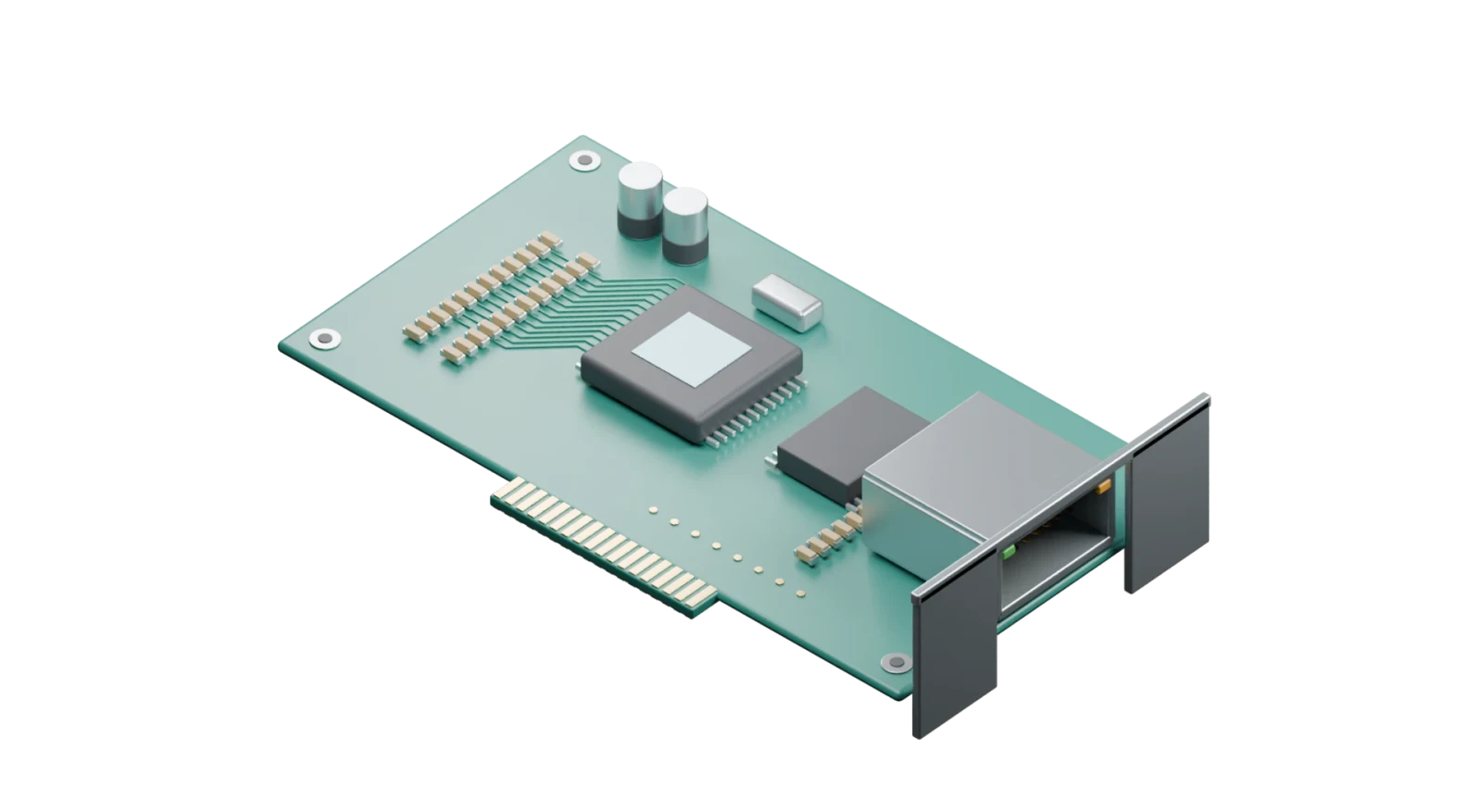
Choose the numbered parts in order. The selected part gains a green highlight, while the rest stays in place so you can see where it belongs. You can drag to turn the card; the view and size buttons also work without a mouse wheel.
1 · Computer connection
The gold contacts plug into a PCI Express slot in the computer. PCI Express is the connection used to exchange data with the computer. The operating system prepares data in memory, and its driver tells the card what work is ready. A driver is software that knows how to control this device.
Original Blender model of a representative Ethernet card. Component arrangement and scale are illustrative; the model does not claim to reproduce a commercial product.
Now return to our photo. Software prepares the data; the card handles its part of the local transmission; the cable carries the signal. At the other end, another interface recovers the data. That explains how data can move, but it leaves a question: if several interfaces share a local network, which one should accept a particular delivery?
Read a MAC address one piece at a time
An Ethernet frame includes a destination MAC address and a source MAC address. Destination means the interface receiving this handover; source means the sending interface. The common Ethernet MAC address has 48 bits. Rather than writing forty-eight 0s and 1s every time, we group them into six bytes. One byte contains eight bits, so .
We can shorten the writing once more. Four bits have sixteen possible patterns: each bit doubles the choices, giving . Hexadecimal gives those sixteen values one symbol each: 0 through 9, then A, B, C, D, E, F for ten through fifteen. Two hexadecimal symbols therefore represent one byte. The colons separate bytes; they are not extra data bits.
Open one of the six bytes
Choose one of the six pairs below. Its eight bits appear underneath. We build the place values from the right: the last position counts ones; the next counts groups of two; two groups of two make four, then eight, sixteen, thirty-two, sixty-four and one hundred and twenty-eight. A 1 includes that amount, and a 0 leaves it out. Click a bit to switch it or move the slider. Only the selected byte changes; choosing another byte keeps your earlier edits so you can compare them. “Reset example” restores all six original bytes.
A 1 includes its place value; a 0 contributes nothing. Here . To write this same value in hexadecimal, count full groups of sixteen: . The two hexadecimal digits are therefore 5E.
This slider explains the representation. Changing the first byte can also change the address category; it does not configure a real network interface.
In the starting example, 5E means five groups of sixteen and fourteen more: . The byte inspector shows the same 94 as 01011110: . The binary, decimal and hexadecimal forms describe the same byte.
Follow one delivery, then another
A nearby printer and a server across the Internet cannot be reached in the same way. IP addresses let software identify network destinations and choose a route through networks. An IP packet is a unit of data with this network-level addressing. On an Ethernet link, that packet rides inside a frame whose MAC addresses arrange the current local handover. The computer’s route table decides whether to hand over directly or use a gateway (a device that forwards traffic to another network); it does not make this decision by comparing MAC addresses.
We also need a link between the two kinds of address. For IPv4 on this local Ethernet network, ARP asks which MAC address belongs to a known next-hop IP address. “Next hop” means the next receiver on the route: the final device or a router. Watching this question and its reply shows how the sender obtains the address it needs to send the photo data.
Switch between the local printer and remote server to compare their routes. Next step advances one handover. The green outline identifies the device doing the current work. The address box separates the frame from its contents, and the caption explains what has changed.
Choose where the photo must finish
The final recipient is the printer at 192.0.2.20. Our example route table says that it is on this local network, so we can deliver directly to its network interface.
——The drawing compresses the network path. ARP is the IPv4 example here; IPv6 uses neighbour discovery. Ethernet error checking can detect many transmission errors but does not itself promise that an entire file will arrive.
An interface address can change
The address belongs to an interface in the network, not permanently to a person. One computer can have an Ethernet interface and a Wi-Fi interface with different addresses. Manufacturers can allocate addresses from registered blocks, but software can also set locally administered addresses. Private Wi-Fi addressing uses this possibility to reduce tracking across networks, and some settings rotate the address over time.
00:00:5E:00:53:10This example comes from an address range reserved for documentation. Its individual/group bit is 0, meaning one interface, and its universal/local bit is 0. Manufacturer-assigned address blocks use this latter category, but a copied address does not authenticate the device or prove who owns it.
To inspect those two flags, write the first byte 00 as 00000000. Reading this ordinary written binary form from right to left, the rightmost bit chooses individual (0) or group (1); the next bit chooses universal (0) or local (1). This is a description of the written byte, not the transmission order on the cable.
Two active interfaces using the same individual address on one local network can confuse delivery. Address assignment therefore needs coordination or suitable randomisation and collision handling. “48 bits” describes the size of the field; it does not guarantee that every address in use is unique, that a MAC address cannot change, or that knowing it gives access to a device.
Try the reasoning yourself
1. Your computer sends a packet to a server outside its local network. Which MAC destination is used on the first Ethernet link?
Show the reasoning
The next-hop gateway interface’s MAC. The route table chooses that gateway; ARP can obtain its MAC from its IP. The enclosed IP packet keeps the server as its final destination in our example.
2. What decimal value does the hexadecimal byte 2A represent?
Show the reasoning
A represents ten. The first digit counts sixteens, so . There are still eight bits in this byte; using letters in the written form has not changed its size.
3. A phone reconnects using a different private Wi-Fi MAC address. Must its physical Wi-Fi chip have been replaced?
Show the reasoning
No. Software can choose a different locally administered address for the same interface. The address used for local delivery and the physical chip are different things. A MAC address alone is not proof of a permanent device identity.