How a GPU organises its work
Suppose a picture looks too dark. Before asking how a graphics card can brighten it, let us find out what the computer stores for a picture. We will follow one small patch from its appearance to the numbers we change, then return to the hardware that does the work.
Begin with a picture
We will keep the same small patch of picture throughout this section. Its squares have different shades. Recording each shade as a number lets us change the picture by changing a number. The original patch stays visible below, so we can compare each change with where we started.
Find the small parts of a picture
Here is a tiny patch of a picture. It has light and dark areas. Our example uses only black, white and the greys between them, rather than different colours. We call this a grayscale picture. Using shades alone lets us begin with one number for each small part.
Select “Enlarge this patch”. Its contents will stay the same; only the size of the drawing changes. Look for the small squares that make up the patch.
Build a way to store a number
To keep a picture after we stop looking at it, the computer must store a record. Begin with one storage position that can be in either of two distinguishable states. We write those states as 0 and 1. This one position is called a bit. The written digits describe its state; they are not tiny printed numbers inside the machine.
One bit gives only two different records: 0 and 1. We could agree that one means black and the other means white, but there would be no record left for an intermediate grey. We need more records to distinguish more shades. Try the two states below. Choosing “2 storage positions” gives us another place to store a 0 or a 1; watch how many different records we can now make.
Selected record: 0. One position gives two choices.
Change one pixel, and keep the original
We now have numbers that describe the picture. To make this example lighter, our chosen rule adds 20 to each value. If the sum exceeds the largest stored value, 255, we keep 255 instead. This limit is called clamping. It is a rule for this teaching example, not a complete description of photographic brightness correction.
We have read the original value, 40. Select “Add 20” to do the arithmetic; the original stays visible.
Try both original values. They go through the same rule, but only 250 needs the limiting step to change the sum. A whole picture requires us to repeat this work for every pixel. That gives us a reason to look for hardware that can handle many such jobs.
Open the graphics card
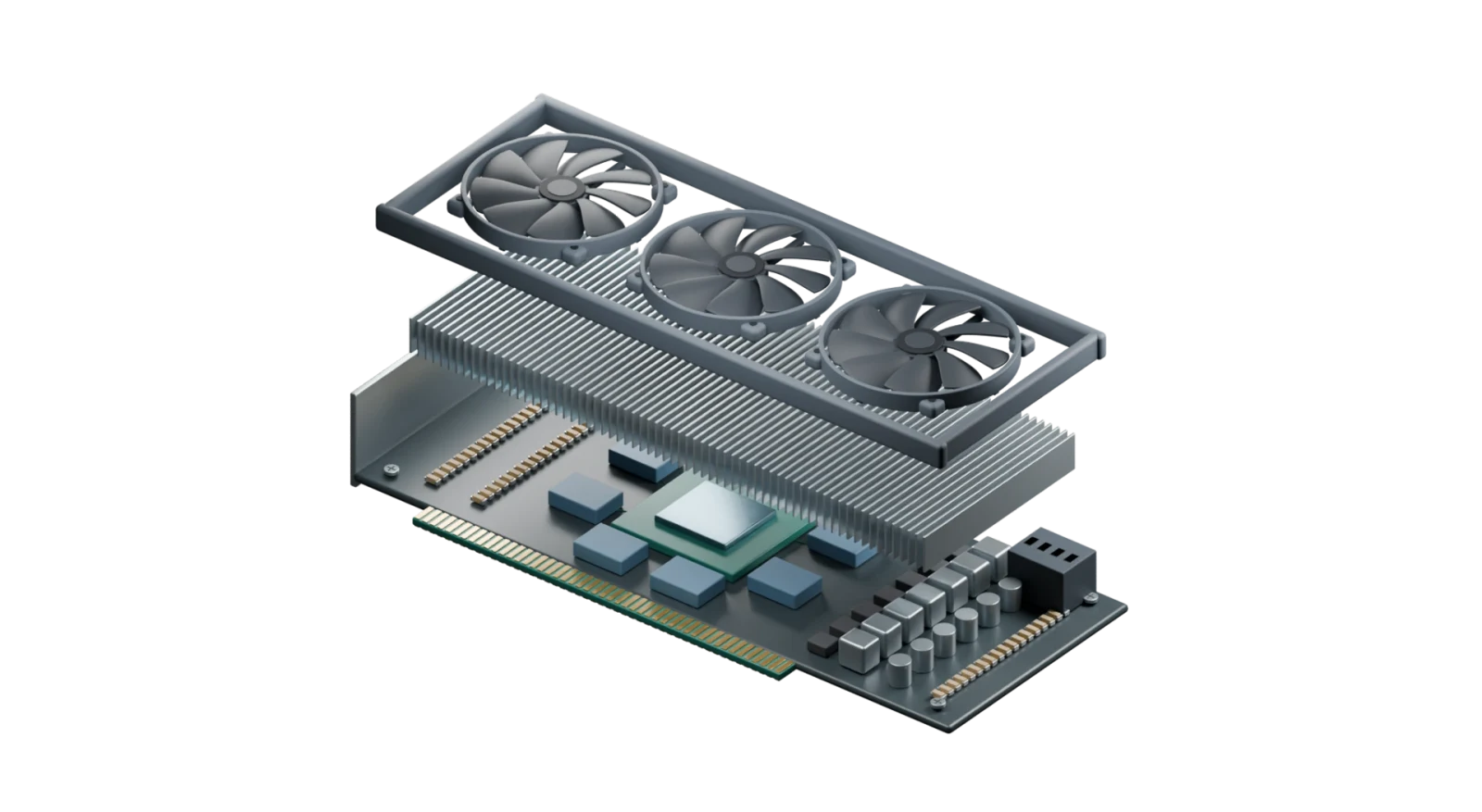
Where could these calculations happen? A separate graphics card has a processing chip, nearby memory, a power supply and cooling parts. These parts do different jobs: the large fans remove heat, while the chip does the calculations. Finding them in the model gives us a place for each task. Inside the chip, we can examine how the work on our picture is organised.
The six buttons name parts of this same graphics card. Start with the chip. A numbered marker and a locating box show the selected part; the matching name stays beside the model. You can focus on that part, then return to the whole card. Separating or hiding the cooling assembly helps us see the board beneath it. These are inspection views, not the card in operation.
GPU chip
The small exposed square is the processing chip. Its circuits execute instructions and calculate results. “GPU” means graphics processing unit; the whole board is a graphics card. A GPU can also be built into a larger processor package without this separate card.
Original Blender model of a representative discrete graphics card. It combines recognisable parts without claiming a particular manufacturer’s circuit layout. The chip’s internal organisation is explained separately below.
Do the same work together
Keep the original sixteen pixel values unchanged. Every pixel must go through the same rule: add twenty, and keep 255 if the sum is too large. A working position is one place that can carry out this calculation. It is not a position in the picture. Begin with one working position; one round then finishes one pixel. The other run uses four equally capable positions, so one round can finish four different pixels.
Choose “Complete next round” to process the next available pixel or pixels. The image labelled “Original input” keeps the input; “Stored output” receives the answers. A blank result means the work has not happened yet. A check mark identifies the pixels completed in the most recent round. You can select a pixel in either image to trace its values below.
Corner numbers identify pixels; the larger numbers are shade values. The grey swatches illustrate these values and are not calibrated light-intensity measurements.
The working positions are ready
Trace pixel 1
Its original value is 40. This run has not processed pixel 1, so there is no stored output for it yet. It is assigned to round 1, at working position 1. Continue the run to see its result appear.
Compare the two runs
Switching between one and four positions preserves both runs. They use the same sixteen inputs and the same calculation. Only the number of working positions changes. Complete both runs to check that the answers agree, even though the number of rounds differs.
| Positions | Rounds completed / needed | Pixels completed / all |
|---|---|---|
| 1 | 0 / 16 | 0 / 16 |
| 4 | 0 / 4 | 0 / 16 |
One position needs sixteen rounds; four positions need four rounds. This is possible because the calculation for pixel 2 does not need the new value of pixel 1. We have not shortened one calculation; we have arranged for different calculations to happen together. The six-second playback interval gives us time to inspect a round. It is not a measurement of real hardware, and these round counts alone do not promise a fourfold speedup for a real GPU.
Inspect every completed calculation in this run
There are no completed calculations yet. Complete the first round above.
Doing work at the same time is parallel execution. Throughput describes how much work is completed in a given time; latency is the time one task waits from its start to its completion. Our four-position example improves the total completion time for the independent pixels. It does not show that every individual instruction has lower latency. CPUs also use parallelism, and a GPU still needs suitable work, data and instructions to keep its resources busy.
Inside the processor
A program is a list of instructions: individual operations such as reading a value or adding twenty. A thread is one execution of those instructions with its own working values. Our pixel example gives one pixel to each thread. Now the GPU chip must provide places to carry out those instructions: storage holds values, control decides which ready instruction to issue, and arithmetic units operate on values. The picture below is a map of responsibilities inside the chip, not a microscopic view of the metal square above.
40 · 100 · 180 · 230
Device memory → nearby cache → registers
Choose ready work; issue the next instruction
Many arithmetic lanes, arranged in repeated groups
| Pixel | Original input | Register copy | Issued instruction | Calculated result | Device memory now |
|---|---|---|---|---|---|
| 1 | 40 | 40 | — | — | 40 |
| 2 | 100 | 100 | — | — | 100 |
| 3 | 180 | 180 | — | — | 180 |
| 4 | 230 | 230 | — | — | 230 |
Keep the first four pixels from our earlier picture: 40, 100, 180 and 230. Before any addition, these numbers are stored in device memory. Reading makes a working copy in a small nearby store called a register; it does not erase the original. Below, each row keeps the same pixel number all the way through. At this stage only the input and register columns contain numbers; the result has not been calculated yet.
A cache is a nearby store that keeps some data to avoid repeating a longer memory access. Some architectures also provide a small memory area explicitly shared by a group of cooperating threads. The exact sizes, names and organisation vary. In NVIDIA terminology, a streaming multiprocessor (SM) contains scheduling, arithmetic and storage resources; a warp is a scheduling group of 32 threads. Our four-position diagram reduces the count so you can inspect it, and does not claim that real warps have four threads.
In GPU computing, the instructions for a chosen operation can be packaged as a function: a named piece of a program that performs a task. A kernel is such a function launched over many threads. For our example, each thread can be assigned one pixel, read its value, add twenty and store the result. Threads are commonly grouped so that hardware can organise and share resources. The phrase SIMT, single instruction, multiple threads, describes this style of executing a common instruction across multiple threads with separate data.
When the work must wait
The pixel example worked well because each answer could be found without waiting for another answer. Two changes can make work harder to keep together: a later operation may need an earlier result, or threads in a group may need different instruction paths. Let us inspect those separately.
A chain of dependent results
Now change the job. Start from 10, add 3, then use that answer as the input to the next addition. This written procedure asks the next step to read the previous result. Next step exposes one link; unused positions cannot bypass that missing input.
Only the starting value 10 is ready.
For this specially simple chain, we could rewrite the algorithm and directly calculate each value from its position. That would be a different way to organise the work. The lesson is to inspect dependencies in the actual algorithm, rather than assume that extra hardware automatically removes them.
When a group needs different instructions
Use a new rule: values below 128 become 20 brighter, and the others become 20 darker. Choosing between instruction paths is called a branch. A group that issues instructions together cannot treat two different operations as one identical instruction. In this simplified trace, lanes that match one path work while the others wait. When the other path runs, the waiting lanes do their work. Waiting lanes keep their values; they do not apply the wrong rule.
This group needs 2 instruction paths. Two paths are needed because different threads made different choices. This is branch divergence. The model counts paths, not hardware clock cycles. Actual scheduling and reconvergence depend on the architecture and program.
Memory can also make arithmetic wait. If values have not arrived, having an unused arithmetic unit is not enough. The scheduler can often run another ready group while one waits. This can hide some waiting by doing other work, but it does not make the original memory access instantaneous and cannot create useful work when none is ready.
Count the whole journey
With a discrete GPU, input data may have to move from the computer’s main memory to device memory, the work must be launched, and results may have to come back. Those transfers and preparation take time. Keeping reusable data on the device can reduce repeated trips. Integrated GPUs and unified-memory systems organise storage differently, but data availability and movement still matter.
Here, one invented time unit is the time needed for one work position to finish one item. Both teaching machines have equally fast positions. One has a single position; the other has four but needs extra setup and transfer time. Change the amount of work to compare the machines at the same cost. Keeping that amount fixed while changing the extra cost shows the cost’s effect separately. These are assumptions for reasoning, not measured performance data.
One position finishes one item per time unit, so 16 items need 16 units. Four positions finish four independent items per batch, so batches need 4 units. Then add the overhead: units in total. The four-position machine finishes this example sooner.
If the item count is not divisible by four, a final partly filled batch is still needed. For example, ten items make two full batches of four and one last batch of two, giving three batches. The batch count is the item count divided by four, rounded up. Empty positions in that final batch do not create extra completed work.
Now connect the parts of the explanation. A GPU can be effective when a large amount of suitable work keeps many execution resources occupied, instructions cooperate with the grouping, and data moves efficiently. More cores or more memory capacity alone cannot settle the question. A real comparison must measure the intended workload, including any relevant transfers, rather than multiply a toy lane count into a promised speedup.
From a triangle to screen pixels
Our photo example began with pixel values already stored. A game often begins earlier, with the surfaces of objects described by many triangles. A triangle is fixed by three corner points, called vertices. The program supplies those points and a viewing position; the GPU transforms their coordinates into the view and works out which parts of the screen they cover.
Here the three vertices have already been placed in the screen view. The orange outline joins them into one triangle. The square grid stands for the screen pixels; its cells are greatly enlarged so we can examine them.
Click a pixel to check the coverage decision. Take the top-left corner as (0, 0), measure x to the right and y downwards, in pixel widths. The triangle vertices are (0, 0), (6, 0), (0, 6). Moving one unit right along its sloping edge reduces y by one, so the edge satisfies . A centre with a smaller sum lies inside; equality is excluded by our stated edge rule.
Selected centre: (0.5, 0.5); 0.5 + 0.5 = 1 < 6. Inside — receives colour at step 3.
For a three-dimensional scene, several triangles may reach the same screen location. A depth value records how far a surface is along the view. A depth test can keep the nearer visible surface and reject one hidden behind it. Rendering also handles textures, lighting, transparency and edges. Our single flat triangle isolates one necessary bridge: a geometric surface must become values that the screen can display. Many of the per-vertex and per-fragment operations provide the repeated work that suits a GPU.
Use the idea again
1. Ten independent pixels are assigned to four equally fast positions. How many batches are needed?
Show the reasoning
The first batch finishes four, and the second finishes four more, leaving . The two remaining pixels still need a third batch. Therefore three batches are needed; the last two positions sit unused in that final batch.
2. In the toy model, four items take four time units on one position. Four positions need one compute unit plus eight overhead units. Which finishes first?
Show the reasoning
The four-position total is , while the one-position total is 4. The one-position machine finishes first here. Parallel calculation saved three units, but the added overhead cost eight. This is an explanation of the toy assumptions, not a general CPU/GPU ranking.
3. Why is doubling the video-memory capacity not the same as doubling image-processing speed?
Show the reasoning
Capacity tells us how much fits. If the data already fits, additional space may leave the calculation unchanged. Speed can instead be limited by arithmetic, instruction dependencies, transfers or memory bandwidth. Identify which limit is actually holding this task back.